Befit Core & BeFit Platinum. BeFit Core provides single-gym access and regular classes, while BeFit Platinum includes multi-gym access, specialty classes, and additional benefits. Membership features and prices may vary per branch. For a full comparison, please visit: https://www.befit.ph/signup/plan and click "Compare".
How can I access the gym?
BeFit uses AirFob, a mobile-based access system inside the BeFit app. No physical key fob is required. The BeFit app is available for download in the Apple App Store and Google Play Store. Search "Befit Philippines" in store.
Make sure to turn on your Bluetooth and enable location in your phone settings and in the BeFit Philippines app settings.
Download the BeFit App from the App Store or Google Play.
Open the BeFit app
Type the email address you used to sign up for your membership. Log in using OTP
Once logged in, tap on your profile (upper right corner)
Select digital key
Tap "Activate Digital Key on This Device"
Once activated, you'll see a green circle indicating your key is active and you may tap on the reader to enter the gate.
My payment method failed—what do I do?
If a payment fails, BeFit retries up to three times. If payment fails, your account gets temporarily suspended, and your digital key will stop working. Please make sure to:
Check if your credit card is locked, and speak with your bank to unlock the card so payments can go through.
Ensure your account has sufficient funds so payments can go through.
How do I speak with a live agent?
At BeFit, our team is available in two simple ways:
Visit us in-club and speak with our team directly (once the club is open)
Submit your case here in the chat by clicking the following link.
We'll get back to you by email — or in person if needed.
I was charged twice (double charges) — what should I do?
No need to worry! Duplicate charges can happen sometimes due to payment processing issues, internet problems, or bank communication hiccups, but we're here to help you get it sorted out. Take a moment to check your email for the payment receipts — sometimes one may look like a pending charge on your statements and then disappear within 24-48 hours.
If you find that both charges went through, don't worry at all; we'll take care of it. Just reach out to our Club Manager directly by clicking on this link. They'll be happy to review the charges and assist you further.
I was charged but didn't receive any confirmation — what should I do?
Sometimes, email typos can happen while you're filling in your information. Please check your Promotions or Spam folder to see if our messages were filtered there.
If everything looks correct but you're still not receiving emails, you can reach out to the BeFit team by submitting the support form. Your inquiry will be reviewed by one of our Club Managers or customer service agents, and we'll get back to you within 24 hours on weekdays, or by the next working day if it's the weekend.
When do my recurring payments start?
Recurring payments only begin after your home gym opens and your membership is activated. No recurring charges before opening.
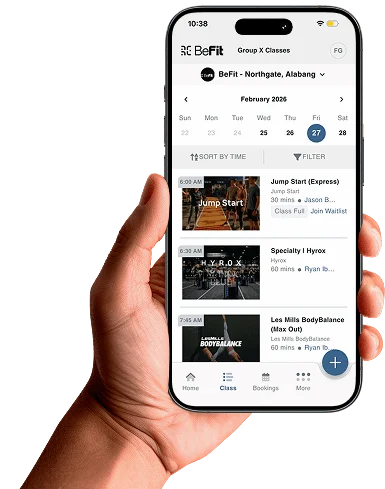
Everything BeFit, All in One App
Manage your membership: Cancel, Freeze, and UpgradeComing Soon